What Are Scrapbook Layout Templates?
Scrapbook layout templates are pre-designed patterns for creating scrapbook pages. They provide a framework that helps organize photos, text, and decorative elements. These templates simplify the creative process by offering a starting point for design.
Templates come in various styles, including grids, collages, and theme-based layouts. Some are minimalistic, while others are detailed and artistic. Designers can customize templates by adjusting colors, adding embellishments, or changing text.
Scrapbook layout templates are suitable for all skill levels. Beginners use them to learn basic design, while experts save time with pre-designed formats. Templates are available in physical form or digital versions, catering to diverse preferences.
In essence, scrapbook layout templates serve as tools that inspire creativity and streamline the design process. They make crafting easier and let you focus on storytelling and memories.
Benefits of Using Scrapbook Layout Templates
Scrapbook layout templates offer numerous benefits for crafters, whether beginners or experts. Here are some key advantages:
Save Time and Effort
Creating a scrapbook from scratch can be time-consuming. Templates simplify this process by offering a ready-made structure. You can focus more on adding personal elements rather than starting from a blank page. This is especially helpful for those with busy schedules.
Enhance Creativity
Templates provide a foundation that ignites creativity. With a basic layout in place, you can experiment with colors, embellishments, and textures. It helps you explore creative ideas without feeling overwhelmed about where to start.
Versatility for All Themes
Templates are available in a variety of styles suitable for different themes and occasions. Whether it’s a wedding, birthday, or travel scrapbook, there’s a template to match. This versatility ensures your scrapbook reflects the story you want to tell.
Improve Design Quality
Not everyone is a design expert, but templates bridge that gap. They ensure your scrapbook layouts look polished and professional. With balanced spacing, photo placements, and decorative areas, your pages will always impress.
Learn Design Basics
For beginners, scrapbook layout templates are a perfect learning tool. They teach essential design principles like alignment, proportion, and color coordination. As you use templates, you develop design skills that help you create unique layouts in the future.
Prevent Creative Blocks
It’s common to get stuck while crafting. Templates eliminate creative blocks by providing structure and inspiration. They guide you on how to arrange photos, journaling, and decorative items effectively.
Cost Efficiency
Many scrapbook layout templates are available for free or at a low cost. Compared to creating intricate designs from scratch or hiring a designer, templates save money without compromising quality.
In summary, scrapbook layout templates streamline your crafting process. They save time, enhance creativity, and help create beautiful designs for treasured memories.
Essential Elements of a Scrapbook Layout
Creating a scrapbook layout involves several key elements that work together for a cohesive design. These elements bring your memories to life and ensure every page tells a story. Here are the essential components:
Photos
Photos are the heart of any scrapbook layout. They capture and display cherished memories. Choose photos that best fit your theme and layout. Ensure they are clear and positioned prominently on the page.
Title
A title provides context for your layout. It highlights the theme or story of your page. Use eye-catching font styles or embellishments to make your title stand out.
Journaling
Journaling adds a personal touch to your scrapbook. Write down dates, captions, or short stories related to the photos. Keep it concise and heartfelt to complement the design.
Decorative Elements
Embellishments, stickers, and die-cuts enhance the visual appeal of your layout. Select decor that matches the theme and does not overshadow the photos or text.
Background
The background sets the tone for your page. Use patterned paper, solid colors, or textured designs to complement your theme. A neutral background works well to keep the focus on photos and text.
Borders and Frames
Borders and frames add definition and structure to your layout. They outline photos and text areas, making them more prominent. Use washi tape, cardstock, or digital frames for a polished look.
Color Palette
A cohesive color palette unifies your scrapbook layout. Choose colors that match your theme and photos. Limit your palette to avoid making the page too busy.
Layout Balance
Organize elements symmetrically or asymmetrically to create a visual balance. Avoid overloading the page with too many elements to maintain harmony.
By incorporating these essential elements, your scrapbook layout will look professional and meaningful. The right mix of photos, design, and personal touches can beautifully preserve your memories.
Popular Themes for Scrapbook Layouts
Choosing a theme for your scrapbook layout helps tell your story more effectively. Themes provide direction and ensure your design is cohesive. Here are some popular themes for scrapbook layout templates:
Travel Adventures
Travel-themed layouts are perfect for preserving memories from vacations or trips. Use templates that feature maps, suitcases, or landmark designs. Include photos of destinations, tickets, or travel journals to enhance the story.
Weddings and Anniversaries
Wedding and anniversary themes focus on celebrating love and commitment. Use elegant templates with floral patterns, lace, or rings. Add heartfelt journaling, such as vows, dates, or short love notes.
Holidays and Festivities
Holidays like Christmas, Halloween, or Easter inspire fun layouts. Use templates with festive colors and icons, such as pumpkins or snowflakes. Highlight family traditions, gift exchanges, or decorations.
Milestones and Achievements
Capture important life events like graduations, promotions, or new beginnings with milestone themes. Choose bold templates with celebratory elements like medals, caps, or trophies. Add journaling to share your proud moments.
Baby and Family
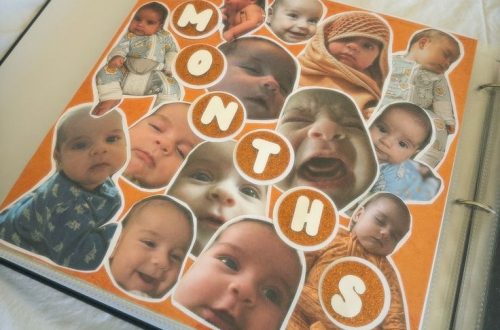
Baby-themed layouts commemorate precious early years. Use soft pastel templates featuring rattles, baby shoes, or teddy bears. Family-themed layouts can include group photos, family trees, or special memories.
Seasonal Layouts
Seasonal themes capture the beauty of nature’s changes. Spring revolves around flowers and greenery, while autumn features leaves and pumpkins. Create layouts to celebrate each season’s colors and moods.
Hobbies and Interests
Document your passions and interests like cooking, gardening, or sports. Use relevant embellishments, such as recipe cards or sports equipment. Reflect your hobbies visually through creative and personalized layouts.
Birthdays and Celebrations
Birthday templates are vibrant and fun. Use designs with balloons, candles, and cakes. Include photos of celebrations, gifts, and any special moments during the day.
Vintage and Retro Styles
For a classic touch, select vintage or retro-themed layouts. Use sepia tones, retro icons, and antique photo frames. These themes work well for family archives or historical collections.
Selecting a theme sets the foundation for a well-designed scrapbook. With endless themes available, you’ll find one perfect for your story and memories.
Step-by-Step Guide to Designing a Scrapbook Layout
Designing a scrapbook layout is simple with a clear set of steps to follow. Whether you’re a beginner or an experienced crafter, this guide will help you create meaningful, visually appealing scrapbook pages.
Step 1: Choose a Theme
Decide on the theme of your scrapbook layout. This gives your design a focal point. Popular themes include travel, weddings, holidays, or baby milestones. Select a theme that reflects your story or memories.
Step 2: Gather Your Supplies
Collect all necessary supplies before starting. Gather photos, scrapbook layout templates, embellishments, papers, and adhesives. Organizing your tools reduces delays during crafting.
Step 3: Select a Template
Pick a scrapbook layout template that fits your theme and style. Templates with grid patterns, collages, or decorative designs work well. A template ensures balance and simplifies the design process.
Step 4: Plan Your Layout
Plan where elements will go. Decide where photos, journaling, and decorations will be placed. Sketch a rough outline to visualize the final design.
Step 5: Arrange Photos and Text
Start by placing photos on the template. Add titles and journaling to match your theme. Ensure your text complements your images and fits well within the layout.
Step 6: Add Decorative Elements
Decorate your layout with embellishments, stickers, or die-cuts. Choose elements that enhance but don’t overpower your page. Keep the focus on your photos and text.
Step 7: Finalize the Background
Select a background that complements your theme. Patterned papers, textured designs, or solid colors work well. Avoid overly busy backgrounds to keep the spotlight on your memories.
Step 8: Check for Balance
Ensure your layout is visually balanced. Adjust elements for symmetry, spacing, and harmony. Avoid cluttering the page to maintain a clean look.
Step 9: Secure Your Design
Once satisfied with the arrangement, securely affix all elements. Use glue, tape, or digital tools for a polished finish.
Step 10: Review and Refine
Review your layout for any adjustments. Check spelling in journaling and alignment of elements. Refine as needed to create the perfect scrapbook.
By following these steps, you can design scrapbook layouts that are creative and meaningful. Use scrapbook layout templates to streamline the process and focus on telling your story.
Tips for Choosing the Right Scrapbook Template
Selecting the perfect scrapbook layout template is crucial. It sets the tone for your entire project. With endless options available, the process may feel overwhelming. Here are some useful tips to help you make the right choice:
Define Your Purpose
- Decide the purpose of your scrapbook beforehand.
- Is it for a specific event, memory, or a general theme?
- Your purpose will guide you to select a matching template style.
Match the Theme
- Choose a template that complements your theme.
- For travel, look for layouts with maps or destination visuals.
- For weddings, seek elegant and romantic designs.
Consider Flexibility
- Opt for templates that allow easy customization.
- Look for adjustable text sections, photo placeholders, and editable colors.
- This will help reflect your personal style.
Assess Skill Level
- Beginners may prefer templates with simpler designs.
- Advanced crafters can explore intricate layouts.
- Choose a template that matches your comfort and creativity level.
Focus on Quality
- Select templates with clear and balanced design elements.
- Avoid overly cluttered or distracting designs.
- Prioritize templates that highlight your photos and stories.
Evaluate Size and Orientation
- Check the size and format of your template.
- Ensure it matches your photos and available space.
- Consider portrait, landscape, or square layouts as needed.
Check for Versatility
- Select templates that work for multiple occasions.
- Versatile designs save time and adapt to various memories.
- This is helpful if you create several scrapbooks.
Look for Free or Affordable Options
- There are many free or low-cost templates available online.
- Start with free choices to explore different styles first.
- Invest in premium templates if needed for special projects.
Try Before You Commit
- Test digital templates before finalizing.
- Print out styles or use digital editing tools temporarily.
- This gives a better idea of the final outcome.
Prioritize Your Aesthetic
- Select templates that match your style preferences.
- Whether minimal or decorative, ensure your choice feels personal.
- A template should make crafting enjoyable and satisfying.
By keeping these tips in mind, you will find the ideal scrapbook layout template. The right template will enhance your creativity and help you craft beautiful and meaningful pages.
DIY vs. Pre-Made Scrapbook Layout Templates
When creating a scrapbook, you can choose between DIY and pre-made layout templates. Both options have unique advantages, depending on your needs and creativity. Here’s how they differ:
DIY Scrapbook Layout Templates
Benefits:
- Full Customization:
- You have complete control over the design.
- Tailor every detail to your preference and style.
- Unique and Personal:
- Every template is one-of-a-kind.
- You can make your scrapbook truly personal and meaningful.
- Cost-Effective:
- Use materials you already have.
- Save money by not purchasing ready-made templates.
- Creative Freedom:
- Unleash your creativity without the limits of pre-designed structures.
- Experiment with different layouts, designs, and embellishments.
Considerations:
- Time-Consuming:
- Designing from scratch takes more time.
- It may not be suitable for quick projects.
- Requires Design Skills:
- Beginners may find it challenging.
- Learning curve might slow down the process initially.
- Resource-Intensive:
- You may need more tools and materials.
- Advanced designs might require additional investments.
Pre-Made Scrapbook Layout Templates
Benefits:
- Saves Time:
- Pre-made templates speed up the design process.
- Focus on storytelling instead of layout planning.
- Professional Designs:
- Achieve polished and balanced layouts without being a design expert.
- Great for beginners who need guidance.
- Theme Variety:
- Wide range of themes and styles available.
- Find templates for any occasion, from weddings to birthdays.
- Easy to Use:
- Designed to be user-friendly.
- Just add photos, text, and embellishments.
Considerations:
- Limited Customization:
- Some templates may restrict creative input.
- Adjustments might not achieve the exact desired look.
- May Cost Money:
- Premium templates come with a price.
- Free options might have limited features.
- Not Entirely Unique:
- Templates can be widely used by others.
- Your scrapbook might look similar to someone else’s.
Which Option to Choose?
Choose DIY if:
- You enjoy crafting from scratch.
- You want a fully personalized, unique design.
- Time and effort aren’t a concern.
Choose Pre-Made Templates if:
- You want faster results.
- You prefer polished designs without extensive effort.
- You are a beginner learning scrapbook layout basics.
Whether DIY or pre-made templates, both can help create memorable scrapbook layouts. Pick the option that matches your goals and skills.
Best Tools and Apps for Scrapbook Layout Design
Scrapbook layout templates can be designed with ease using various tools and apps. These solutions cater to both beginners and professionals. Let’s explore some of the best options available:
Canva
- Offers a user-friendly interface for creating scrapbook layouts.
- Includes a wide selection of templates, fonts, and graphics.
- Allows customization of colors, backgrounds, and text boxes.
- Accessible from both desktop and mobile devices.
Adobe Spark
- Provides professional-grade tools for crafting scrapbook layouts.
- Offers customizable templates with premium design options.
- Seamlessly integrates with Adobe Photoshop for advanced edits.
- Ideal for users familiar with Adobe’s design software.
PicCollage
- Perfect for creating quick, creative scrapbook pages on mobile devices.
- Features photo cropping, stickers, and colorful text additions.
- Supports in-app photo importing from your gallery or social media.
- Simplifies layout designs with pre-designed templates.
Creative Memories Scrapbook Software
- Specializes in digital scrapbooking with customizable templates.
- Offers themed kits and layout ideas for specific occasions.
- Provides detailed tools for layering photos, backgrounds, and text.
- Great for creating high-quality, printable scrapbook pages.
Affinity Publisher
- Advanced software designed for professional layout design.
- Offers precise control over text, images, and decorative elements.
- Features a grid system for perfect photo and text alignment.
- Accommodates both digital and printable scrapbooking projects.
Scrapbook Flair
- Free digital scrapbooking software with a vast library of patterns and templates.
- Supports the addition of embellishments and text to layouts.
- Includes sharing options to showcase designs with friends and family.
Fotor
- Online photo editing software with a focus on collages and scrapbooks.
- Offers drag-and-drop functionality for designing layouts.
- Provides various filters, frames, and text customization.
- Accessible for both beginners and experienced users.
Project Life App
- Designed specifically for digital scrapbooking on mobile devices.
- Easy drag-and-drop photo and journaling card options.
- Includes pre-made layout options for quick scrapbook creation.
GIMP
- A free, open-source software with powerful photo editing tools.
- Allows detailed customization of scrapbook layouts.
- Requires some learning curve but highly versatile for advanced users.
Lucidpress
- An online design tool suitable for scrapbook layouts.
- Features drag-and-drop interface and customizable templates.
- Offers professional-grade tools for high-quality designs.
- User-friendly and perfect for all skill levels.
Using these tools, scrapbook enthusiasts can craft beautiful layouts that preserve memories. Many of these are free or offer affordable plans. Select the one that best suits your design needs and skills.
Conclusion: Elevate Your Scrapbooking Experience
Utilizing scrapbook layout templates can significantly enhance your scrapbooking projects, whether you’re creating a simple album or an elaborate memory book. With various templates available and ample design inspiration, you have countless opportunities to craft stunning albums that preserve your cherished memories.
By implementing the tips and ideas presented in this article, you can develop unique and beautiful scrapbook pages that tell your story. Get creative with color schemes, materials, and themes to make your scrapbook a true reflection of you. So gather those materials, print out your favorite templates, and start creating the scrapbook of your dreams!